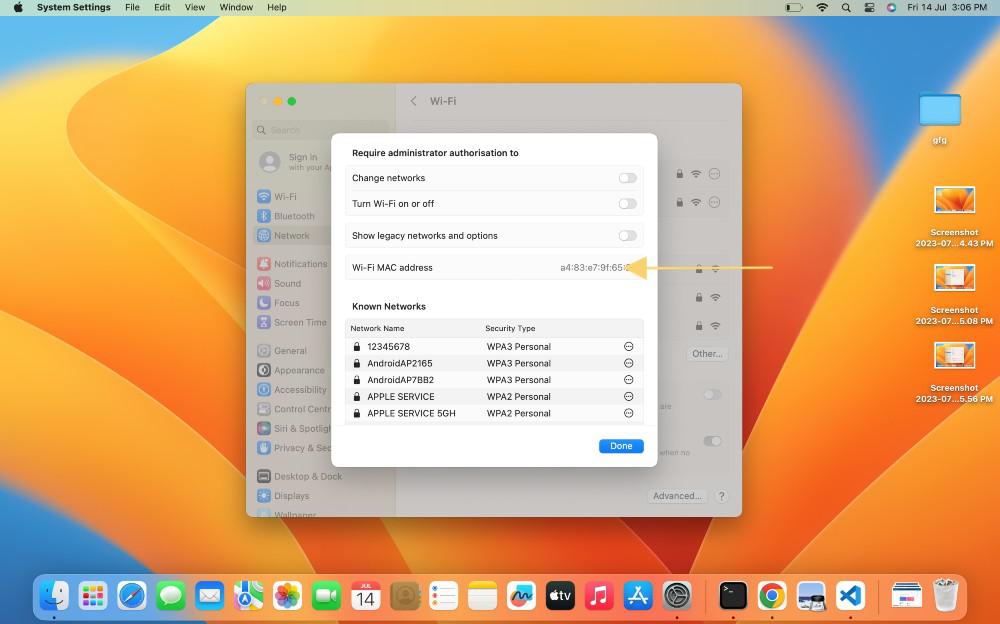
In today’s hyper-connected world, almost every device that touches a network whether it’s your smartphone, laptop, smart fridge, or even a gaming console has a unique identifier known as a Media Access Control MAC lookup address. This 12-digit hexadecimal code, often written as six pairs separated by colons (e.g., 00:1A:2B:3C:4D:5E), is burned into the hardware by the manufacturer and theoretically stays with the device for life.
The short answer is both yes and no. You can discover a surprising amount of information such as the manufacturer, the country where the device was made, and sometimes even the exact product line but pinpointing the individual person or current owner is usually impossible through public tools alone. Privacy laws, constantly changing device ownership, and the way MAC lookup randomization works in modern devices all stand in the way of a straightforward “reverse lookup” like you might do with a phone number.
What Exactly Is a MAC Address and Why Does It Matter?
A Media Access Control address functions as the “fingerprint” of network hardware at the data link layer (Layer 2) of the OSI model. Unlike IP addresses that can change every time you reconnect, a MAC address is meant to be permanent and globally unique.
How MAC Addresses Are Structured
The first six digits (three bytes) form the Organizationally Unique Identifier (OUI), assigned by the IEEE to the manufacturer. The remaining six digits are assigned by the manufacturer itself to each individual network interface.
The Difference Between Local and Universal MACs
Universal (globally administered) addresses have the second-least-significant bit of the first octet set to 0, while locally administered addresses (used in virtual machines or privacy modes) have it set to 1.
Why MAC Addresses Still Matter in 2025
Even though higher-layer protocols dominate modern networking, MAC addresses remain crucial for Wi-Fi authentication, DHCP assignments, switch port security, and IoT device identification on local networks.
Can You Actually Find the Owner of a Specific MAC Address?
The honest truth is that public MAC lookup tools can only reveal the registered vendor, not the current human owner. Think of it like finding the car manufacturer from a VIN’s prefix you’ll know it’s a Toyota, but not who’s driving it today.
What Public OUI Databases Reveal
- Vendor name (e.g., Apple, Samsung, Espressif)
- Physical address of the manufacturer’s headquarters
- Block size and date the OUI was assigned
- Whether the block is still active or legacy
Why Individual Ownership Remains Private
MAC addresses are not tied to personal identities in any central registry. Once a device leaves the factory, ownership transfers are never reported back to the IEEE or any public database.
Real-World Success Rate for “Owner” Lookups
In practice, less than 0.1% of random MAC addresses can be traced to a specific person using only open-source intelligence, and even those cases usually involve leaked enterprise asset databases rather than public tools.
Best Free MAC Address Lookup Tools in 2025
Fortunately, dozens of reliable, up-to-date tools let you instantly resolve the vendor behind any MAC address or OUI. Most pull directly from the official IEEE registry that is refreshed weekly.
Top Completely Free Online Tools
- maclookup.app – Clean interface, API access, no ads
- wireshark.org’s OUI lookup – Official IEEE data, downloadable CSV
- dnschecker.org/mac-lookup – Fast, mobile-friendly, bulk lookup option
Browser Extensions and Mobile Apps
Several Chrome/Firefox extensions and Android apps keep an offline copy of the OUI database, letting you identify devices even without internet access during fieldwork.
Command-Line Options for Power Users
Tools like “macvendors.com” API, “nmap –O” with updated databases, or the Python library “mac-vendor-lookup” give sysadmins instant vendor resolution straight from the terminal.
How MAC Address Randomization Destroyed Traditional Tracking
Since iOS 14, Android 10, and Windows 10, most consumer devices now use randomized MAC addresses when connecting to Wi-Fi networks—completely breaking the dream of long-term tracking using MACs alone.
How Randomization Works Technically
Every time your phone connects to a new Wi-Fi network (or periodically on known networks), it generates a fresh, temporary MAC from the same vendor OUI but with random trailing bytes.
Which Devices Still Use Static MACs
- Desktop PCs and laptops on Ethernet
- Most IoT devices (smart bulbs, cameras, printers)
- Enterprise-managed devices with randomization disabled by policy
How Network Admins Work Around Randomization
Many organizations now force devices to use their real MAC through certificate-based authentication (802.1X) or captive portals that require login before internet access.
Legal and Ethical Boundaries of MAC Address Investigations
Trying to deanonymize someone using only their MAC address can quickly cross legal lines, especially in the era of GDPR, CCPA, and emerging IoT privacy regulations.
When MAC Lookups Are Perfectly Legal
Checking the vendor of devices on your own network, performing authorized penetration testing, or identifying counterfeit hardware in a corporate environment are all legitimate uses.
When It Becomes Stalking or Illegal
Collecting MAC addresses in public spaces to build movement profiles without consent has already led to multi-million-euro fines in the EU under GDPR Article 5.
Best Practices for Ethical Network Monitoring
Always inform users when you log MAC addresses, retain data only as long as necessary, and anonymize logs whenever possible to stay on the right side of privacy laws.
How to Perform a MAC Lookup Right Now
Ready to try it yourself? Follow this exact process used by network engineers worldwide to identify any unknown device on your network in under thirty seconds.
Using Your Router’s Admin Page
Log into your router (usually 192.168.1.1 or 192.168.0.1), navigate to “Connected Devices” or “DHCP Table,” copy the suspicious MAC, and paste it into any tool from the list above.
From Command Line (Windows/macOS/Linux)
- Windows: run “arp -a” in Command Prompt
- macOS/Linux: run “arp -a” or “ip neigh” in Terminal
- Copy the MAC and query it instantly with curl “https://freemaclookup.com/”
Bulk Lookup for Entire Networks
Export your router’s device list as CSV, then upload it to sites like maclookup.app or use offline tools like “MAC Vendor Lookup” spreadsheet templates updated monthly from IEEE.
Conclusion
While a MAC address lookup will reliably tell you the manufacturer and often the exact device model range behind any network connection, discovering the actual human owner through public tools alone remains practically impossible in 2025. Randomization, privacy laws, and the sheer scale of device turnover have permanently closed that door.