In today’s hyper-connected world, almost every gadget that touches a network from your smartphone to a smart refrigerator has a unique identifier called a MAC address. When troubleshooting connectivity issues, securing a network, or simply trying to identify an unknown device on your Wi-Fi, many people turn to MAC lookup tools. These online services promise to reveal the manufacturer, device type, and sometimes even the model just by entering a MAC address. It sounds almost magical, but the burning question remains: does MAC lookup actually work for all network devices, or are there important exceptions and limitations most users never notice?
The short answer is no it doesn’t work universally. While MAC lookup is remarkably accurate for consumer-grade laptops, phones, routers, and IoT gadgets produced in the last two decades, it frequently fails or returns incomplete information for enterprise equipment, virtual machines, custom-built devices, older hardware, and anything using randomized MAC addresses. Understanding exactly where it shines and where it falls flat can save network administrators, cybersecurity enthusiasts, and everyday users hours of frustration.
What Is a MAC Address and How Does It Work?
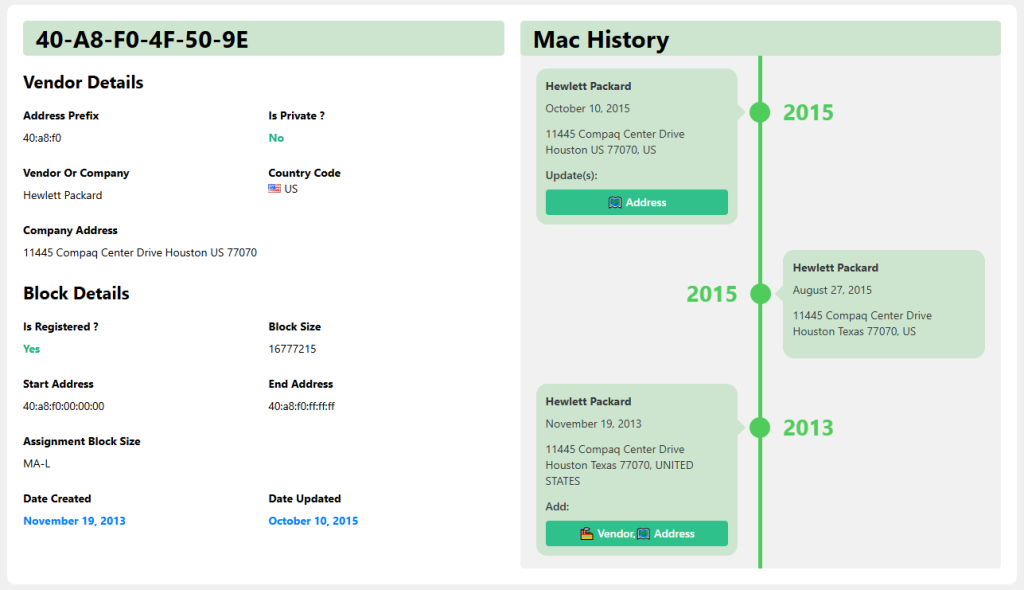
A Media Access Control (MAC) address is a 48-bit hardware identifier burned into every network interface controller (NIC) during manufacturing. Expressed in six pairs of hexadecimal digits (e.g., 00:1A:2B:3C:4D:5E), the first three octets represent the Organizationally Unique Identifier (OUI), which tells us the manufacturer, while the remaining three are unique to that specific device.
The OUI Registry and IEEE Management
The Institute of Electrical and Electronics Engineers (IEEE) maintains the official public registry of OUIs. Companies like Apple, Cisco, and Samsung pay for blocks of addresses and are listed in this database, which is freely downloadable and powers virtually every online MAC lookup tool.
Locally Administered vs Universally Administered Addresses
The second bit of the first octet determines whether an address is universally administered (U/L bit = 0) or locally administered (U/L bit = 1). Locally administered addresses are set by software or users rather than the manufacturer, instantly breaking most lookup tools because they lack a registered OUI.
IPv4 ARP and IPv6 Neighbor Discovery Relationship
MAC addresses operate at Layer 2 of the OSI model and are discovered through protocols like Address Resolution Protocol (ARP) in IPv4 networks or Neighbor Discovery Protocol (NDP) in IPv6. These mechanisms are what allow your router to build its device table that you later query with MAC lookup tools.
Why MAC Lookup Succeeds for Most Consumer Devices
For the vast majority of smartphones, laptops, tablets, and smart home gadgets released since the early 2000s, MAC lookup is astonishingly reliable often identifying not just the vendor but the exact product line (e.g., “Apple iPhone 13 Pro” instead of just “Apple”).
Massive Public OUI Databases
Services like Wireshark’s manufacturer database, macvendors.com, and IEEE’s own lookup aggregate millions of entries. Because consumer electronics giants register large OUI blocks and rarely deviate from standards, success rates exceed 95% for modern devices.
Consistent Manufacturing Practices
Major brands such as Intel, Broadcom, Realtek, and Qualcomm dominate the NIC market and follow IEEE guidelines religiously. This consistency means even budget Android phones from lesser-known Chinese manufacturers usually appear correctly in lookup results.
Regular Database Updates by Lookup Services
Popular tools scrape IEEE updates weekly and crowdsource corrections. When a new Xiaomi vacuum cleaner or Google Nest thermostat hits the market, its OUI typically appears in databases within days, keeping accuracy high for new consumer gear.
When MAC Lookup Completely Fails (And Why)
Despite its strengths, there are entire categories of network devices where entering a MAC address into a lookup tool returns “Unknown,” “Private,” or blatantly wrong information. These failures aren’t random they stem from deliberate design choices or regulatory requirements.
- Randomized MAC Addresses: Modern iOS, Android, Windows, and macOS devices rotate MAC addresses per Wi-Fi network for privacy. The address your router sees bears no relation to the hardware address, rendering lookup useless.
- Virtual Machines and Containers: Hypervisors like VMware, VirtualBox, Hyper-V, and Docker generate random or locally administered MACs by default. Even when they mimic real OUIs, the result is rarely meaningful.
- Enterprise-Grade Equipment: Many Cisco, Juniper, Arista, and Palo Alto devices ship with locally administered addresses or use virtual MACs for high-availability clusters (HSRP/VRRP/CARP), instantly breaking standard lookup.
- Custom or DIY Hardware: Raspberry Pi, Arduino, ESP32, and other hobbyist boards let users set any MAC they want. Unless the creator deliberately chose a registered OUI, lookup returns nothing useful.
- Very Old Legacy Hardware: Pre-1998 devices sometimes predate the modern OUI system or belong to defunct companies whose records vanished.
Enterprise and Industrial Devices: A Special Challenge
Large organizations and industrial environments rely on equipment that prioritizes reliability, redundancy, and security over consumer-friendly identification. As a result, MAC lookup often provides little to no actionable intelligence.
Virtual MACs in High-Availability Setups
In failover clusters, both active and standby devices share the same virtual MAC to prevent ARP table disruption. Lookup reveals the original hardware vendor, but you cannot tell which physical chassis currently owns the address.
SDN and Overlay Networks
Software-Defined Networking (VXLAN, NVGRE) and cloud platforms encapsulate Layer 2 frames inside Layer 3 packets. The MAC addresses visible inside the overlay are frequently generated on-the-fly and belong to no real manufacturer.
Strict Privacy Policies in Sensitive Environments
Government, military, and financial institutions sometimes strip or replace real MACs entirely using network access control (NAC) solutions. Tools like Cisco ISE or Aruba ClearPass can force devices to use temporary, anonymous addresses.
Modern Privacy Features That Break Traditional Lookup
Since Apple introduced MAC randomization in iOS 8 (2014) and Android followed with version 10 (2019), the reliability of MAC-based tracking has plummeted in public spaces and deliberately so.
iOS and iPadOS Private Wi-Fi Address
Every time an iPhone or iPad connects to a new SSID, it generates a unique, non-persistent MAC address specific to that network. Even Apple itself cannot map it back to the real hardware address.
Windows 10/11 Random Hardware Addresses
Microsoft enables “Use random hardware addresses” by default for new Wi-Fi networks. The feature rotates the MAC every 24 hours or on reconnect, confusing both lookup tools and rogue access-point detection systems.
Upcoming Standards: IEEE 802.11bh and Beyond
The upcoming 802.11bh standard will formalize randomized and rotatable MAC addresses across all compliant devices, effectively ending the era when a single lookup could reliably fingerprint a laptop or phone.
Practical Alternatives When MAC Lookup Doesn’t Work
Fortunately, network administrators and security analysts aren’t limited to basic OUI databases. Several advanced techniques can identify mysterious devices even when traditional lookup returns blank.
- DHCP Fingerprinting: By examining DHCP option order, TTL values, and client identifiers, tools like p0f or FingerBank can identify device OS and model with >90% accuracy.
- LLDP/CDP and SNMP Queries: Enterprise switches broadcast Link Layer Discovery Protocol or Cisco Discovery Protocol packets containing chassis serial numbers, model names, and software versions far more reliable than MAC alone.
- NetFlow/sFlow Metadata: Modern routers export flow data that includes first-seen MAC plus corresponding IP, port usage patterns, and hostname giving a richer profile than OUI lookup ever could.
- Active Probing with Nmap: Using OS detection (-O) and service fingerprinting, Nmap can identify everything from IP cameras to PLCs even when MAC randomization is active.
- MDNS/Bonjour and UPnP Announcements: Many IoT devices loudly broadcast their friendly names and capabilities over multicast DNS, instantly revealing “Samsung Smart TV – Living Room.”
Conclusion
MAC lookup remains an invaluable quick-check for consumer laptops, phones, and routers, but it is far from universal. Virtual machines, enterprise gear, privacy features, and custom hardware routinely defeat it. Savvy network professionals combine OUI checks with DHCP fingerprinting, LLDP data, and active probing for complete visibility. As randomization becomes the default, relying solely on MAC address lookup will only grow less effective time to expand your toolkit.